Blog
Best CMS for Adult Websites
By Emily Thompson, Content Writer Published Updated 19 min read
For a straightforward editorial site, start your shortlist with self-hosted WordPress; for a shop, compare WordPress with WooCommerce against an eligible hosted store after payment approval. Consider Drupal for tightly structured, multi-reviewer publishing, Joomla for a team suited to its content and access model, and specialist software for video or membership requirements.
This guide is for escort agencies, adult brands, retailers, publishers and directory operators choosing software for their websites. It focuses on publishing, enquiries, structured listings, SEO and day-to-day maintenance.
These are recommendations by use case, not a universal ranking or evidence that a vendor accepts your business. Choose the implementation your team can operate, maintain and leave. The source-linked capabilities and policy checks below were checked in November 2026; confirm them again before committing.
EMA helps adult-sector teams connect website decisions with content and search planning. This guide turns that choice into a shortlist, a practical test and an operating plan.
How do the main CMS options compare
The table is a procurement shortlist. “Best for” describes a recommended starting scenario; maintenance entries are planning judgements rather than measured hours. Source-linked capabilities were checked in November 2026. “Check policy” means obtain a decision for the actual content, products, market and services involved. Export and SEO cells describe what to test, rather than promising that every configuration includes it.
|
CMS |
Best for |
Adult-content policy risk and who decides |
Editing and approval workflow |
SEO control |
Export and exit |
Typical maintenance load |
|
Editorial or information site |
Check host and connected-service policies |
Drafts, scheduling, revisions; test roles |
Test theme, metadata and extensions |
Prove content, files and code handover |
Budget for core, theme and plugin care |
|
|
Eligible hosted publication |
Provider permits limited mature content; exclusions apply |
Test the chosen plan and permissions |
Check plan and template controls |
Test available export and media transfer |
Provider operates hosting; define remaining work |
|
|
WordPress retail operation |
Check host, extensions and payment approval |
Test catalogue and order responsibilities |
Test product and category output |
Prove catalogue, order and file transfer |
Budget for integration and conflict testing |
|
|
Structured, reviewed publishing |
Check host and external-service policies |
Configurable moderation states and revisions |
Specify template and URL requirements |
Prove records, relationships and code handover |
Fund specialist administration and releases |
|
|
Organised content with access rules |
Check host and extension-service policies |
User groups, access levels and permissions |
Test configured templates and extensions |
Prove content, files and configuration transfer |
Assign extension and template maintenance |
|
|
Supported team with separate delivery needs |
Check CMS, application and service providers |
Specify preview and release behaviour |
Test the public application |
Prove API export and front-end handover |
Fund both authoring and delivery layers |
|
|
Eligible hosted retail operation |
Platform, payment and channel rules differ |
Test product, article and staff tasks |
Check required controls on the quoted plan |
Test records, files and URL transition |
Define app, integration and content upkeep |
If you want help identifying existing website constraints before selecting software, request a free SEO and visibility review with your current URL and the publishing problem you need to solve.
Which should you pick for your situation
Solo publisher: Start by testing self-hosted WordPress with a restrained template and a named maintainer. The recommendation assumes that ordinary article publishing matters more than a custom application. First test whether the actual editor can prepare, preview and correct a page without changing its layout.
Small online shop: Compare WooCommerce with an eligible hosted retail option after the relevant providers assess your catalogue. Choose between the complete operating proposals, including support. First test an approved payment integration, failed-payment handling and the staff process for a correction to product information.
Multilingual or multi-reviewer publisher: Start with Drupal when content relationships and review stages drive the project; include Joomla where the team prefers its configured workflow. First test a source correction and its translation review, including what remains live while the change is awaiting approval.
Agency-managed site with developers: Consider a headless arrangement only when separate delivery or reuse solves a defined need. A conventional CMS remains a candidate when it meets the brief. First test unpublished previews and the delay between approval and the public page changing.
Video or membership operation: Compare specialist software against a deliberately scoped membership build against the agreed features and supported integrations. First test access control, account cancellation, export and support responsibility with permitted sample content. A general article editor should not decide the architecture for a substantially different service.
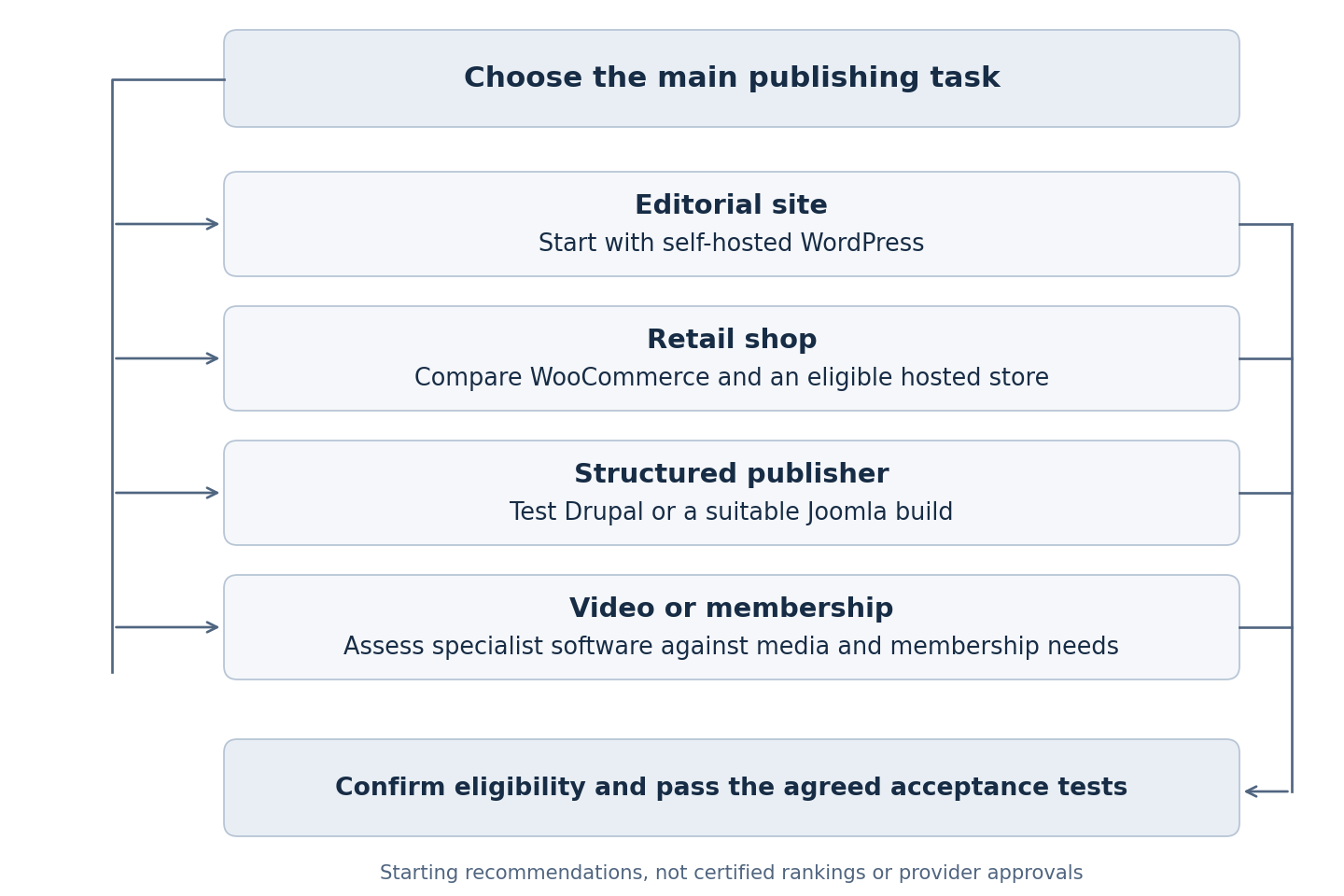
The flow is an original decision aid for this guide. Its branches are starting recommendations; each still requires provider checks and a successful acceptance test.
What must the project brief say before you buy
Describe the records you publish and the work people perform on them. An article may have an author, reviewer, image and translation. A product record may link to care information and a downloadable instruction sheet. Decide which relationships need to be reusable and which can be maintained separately.
Identify the launch scope. A second language belongs in the essential requirements only if there is an approved translation plan. A future app should not dictate the build when nobody has agreed what it will do. Record plausible expansion separately so suppliers can explain its effect without silently charging for it now.
For each essential requirement, write the action, expected result and person responsible for acceptance. Replace “easy to use” with a task: an editor corrects care information, previews it on a phone and submits it for review. Replace “portable” with a test: export a representative record, its files and the relationships needed to rebuild it.
Keep useful features distinct from essential ones. A sophisticated layout builder cannot compensate for an unmet payment requirement or missing recovery arrangement. Require suppliers to identify extensions, external services and custom work needed to satisfy the brief, so apparently similar quotes describe comparable implementations.
How should you interpret the comparison
Treat a policy failure as a reason to remove a configuration from the shortlist, not a weakness to average against attractive features. A permission that has not been confirmed should remain pending. An editorial preference can be traded against cost or training time; an essential unsupported activity needs a different solution.
Compare responsibility as well as capability. Two proposals may both promise export, but one may include a complete handover while the other expects the business to commission a separate migration. Record that difference in the acceptance criteria and quote. Do the same for staff access, recovery and changes to the public templates.
Limit the final shortlist to configurations the business could realistically operate. A system can satisfy the technical brief and still be unsuitable if its maintenance depends on skills or support the business will not fund. Keep the reason for rejecting it available so a later supplier presentation does not restart the same discussion without new evidence.
Check platform compatibility before choosing a CMS
Confirm that your hosting provider, CMS platform and payment processor support your business category and intended website features. Make this a short procurement check before paying for development, then compare the CMS options on their practical merits.
The WordPress.org and WordPress.com distinction matters here: self-hosted software and a hosted publishing service are different arrangements. Check WordPress.com’s mature-content policy for the proposed site. For a hosted shop, check Shopify’s platform policy and payment eligibility separately. These provider references were checked in November 2026.
For an enquiry-led escort agency website, specify the enquiry journey first; a full checkout may not be part of the project. For a retailer or subscription business, ask the developer to demonstrate the supported payment integration, failed transactions, cancellations and staff notifications. A gateway appearing in a plugin catalogue does not establish that it will work with your approved account.
When do adult-specific platforms belong on the shortlist
Specialist video and membership systems deserve a separate evaluation when the requirements involve media conversion, streaming, subscriptions or paid access rather than mainly articles. Define the media library, member roles, subscription options and publishing workflow before assessing the software. Compare those requirements with a general CMS plus the extensions needed to provide them.
Elevated X’s official product page, checked in November 2026, lists membership and video-on-demand formats, automatic encoding and age-verification integrations. Its page also contains licensing and ownership restrictions. Obtain written clarification of the exact arrangement, especially if a proposal involves partners or managing websites for others; do not infer broad rights from a feature list.
Scrile Connect, checked in November 2026, describes white-label membership software with subscriptions, paid content and configurable integrations. That is a vendor description of capabilities, not independent evidence of performance or suitability for your implementation. Assess the proposed configuration and contract separately.
For either category, compare what happens when the relationship ends. Request a sample export containing permitted records, media references and membership statuses. Establish what can migrate and what would require redevelopment. Identify the update policy, supported integrations, support boundaries and controls over public metadata and URLs.
Ask the supplier to demonstrate uploading, organising, replacing and retiring a sample media item. Check what happens to its thumbnails, public URL and member access. Record which tasks staff can complete themselves and which require a support ticket or additional development.
Which CMS features matter for an escort agency or adult brand
Start with the pages and records your team updates each week. An escort agency may need profile pages, locations, availability notes and enquiry routing. A retailer may need product categories, specifications and supporting guides. A directory needs consistent listing fields and a clear process for reviewing changes. These are different content models, even when the finished sites look similar.
Reusable profiles, listings and page templates
Ask the supplier to build one representative record before approving the full design. Use a fictional profile or listing with a display name, description, location, permitted images and contact route. Check whether an editor can change those fields without rebuilding the page or altering unrelated listings.
Keep shared information in a manageable structure. If the same agency contact details appear across several pages, decide where staff should edit them. Test a change and inspect every intended destination. Avoid a design that requires someone to remember which pages contain copied information.
For directories, demonstrate a new listing, an amendment, a temporarily inactive listing and a retired listing. Confirm what visitors see in each state and who can approve the transition. Treat filtering and search as part of this exercise: the visible results should reflect the status and fields you actually maintain.
Enquiry forms and the staff handover
A useful CMS should support the route from a page visit to an enquiry that the right person can handle. Specify which pages need forms, what information is necessary and where submissions should arrive. Use fictional submissions to test confirmation messages, notification delivery and the staff response process.
Check the failure states as well as the successful submission. What does the visitor see if a required field is missing or the notification service fails? Can staff identify an undelivered enquiry without exposing its contents to every editor? Decide whether the CMS needs a submission inbox or whether an approved connected system owns that task.
Keep unnecessary customer details out of demonstration records and restrict access to actual submissions. Ask who can view, export and delete stored enquiries, and identify any copies created by email notifications or integrations. These are practical access and maintenance requirements for the build.
Mobile editing and consistent presentation
Test the everyday changes on the devices your staff use. An editor should be able to correct text, replace an image and preview a page without accidentally changing the site-wide layout. If mobile administration is important, demonstrate it explicitly rather than judging only the public mobile homepage.
Use controlled page components for repeated content such as profile introductions, service summaries and enquiry prompts. Ask what happens when text is longer than expected, an image is missing or a section is unused. Inspect the result on a narrow screen and check that the enquiry route remains easy to find.
Do not accept an attractive demo as evidence that staff can maintain the design. Let the intended editor create a second page from the template. Record confusing fields, layout mistakes and tasks that still need developer help. Include the necessary training or configuration changes in the proposal.
Extensions and integrations without unnecessary complexity
Request a list of the extensions and external services the proposed build depends on. For each, record its purpose, owner, renewal cost and replacement options. Ask which requirements use standard CMS features and which rely on custom code. This makes future support easier to scope.
Test connected tasks with representative sample data: form delivery, catalogue changes, search filters and any booking or payment workflow in scope. Establish how errors are reported and who investigates them. A successful connection during a demonstration is only the first test; the handover should explain how staff recognise and report a later failure.
Prefer the smallest configuration that meets the agreed requirements and leaves room for planned expansion. Extra extensions should solve a specific problem. If two tools overlap, ask the supplier which one owns the task and whether the other can be removed before launch.
How should you test the editor and approval process
Give shortlisted suppliers the same small content set and one combined editorial exercise. Let the intended editor complete it. The exercise should cover drafting, correcting, previewing, approving and recovering a previous version. Record where the editor needs help and where a developer must intervene.
WordPress’s feature documentation, checked in November 2026, lists drafts, scheduling, revisions and user management. Use those capabilities as a starting point for a restrained implementation. Require a separate explanation for additional review stages instead of assuming that every editorial workflow is included in the basic setup.
Drupal’s Content Moderation documentation, checked in November 2026, describes workflow states and a working revision alongside published content. Joomla’s access-control documentation, checked in November 2026, distinguishes groups, viewing access and action permissions. Test the configured responsibilities with individual accounts rather than relying on administrator demonstrations.
For translations, Joomla’s language guidance, checked in November 2026, separates interface language support from the content that editors must translate. Assign responsibility for noticing when a source correction affects another language. Include menus, linked downloads and shared information in the exercise.
For a headless proposal, the WordPress REST API handbook, checked in November 2026, illustrates how content can be exposed to a separate application. Specify the preview, publishing and cache behaviour of your proposed front end. Establish how an urgent correction reaches readers without an unexplained release dependency.
Use the combined exercise to identify training needs and configuration changes. Avoid repeating a complete demonstration for every desirable feature. Spend the available time on essential tasks, awkward corrections and the points where the design could expose private material or publish an unapproved change.
How should shared content and media behave
Add one shared information record to the editorial exercise. For example, a fictional retailer could reuse a care instruction in an article, a product record and a download. Decide whether a correction should update all uses automatically or create separate review tasks. Preview the affected destinations before accepting either approach; the appropriate choice depends on who approves each publication.
Include a permitted image with an internal note explaining its authorised use. Replace the image and check the visible pages, download and thumbnail. Establish who can see the internal note and whether it transfers in an export. Do not put sensitive identity documents into the sample media set to make the exercise appear realistic.
Finally, retire the sample record and inspect its references. Agree whether the reader should see an explanation, a relevant replacement or no component. Save that behaviour with the test evidence. This gives the next maintainer a practical account of the content relationships rather than leaving them to infer the design from a collection of files.
Which SEO controls should acceptance cover
Inspect actual public pages from the proposed build. Include an article, a category and, where relevant, a product. Check the visible heading, title, description, canonical address and internal links. Establish who can change each setting and which work requires a template or application update.
Google’s JavaScript SEO guidance, checked in November 2026, explains its rendering process and the value of server rendering or pre-rendering. A headless label does not establish what your application delivers. Compare the initial response with the rendered content and investigate missing text or links.
Test the awkward cases: a removed product, an empty category, a long title, a renamed page and an unavailable download. Decide which filtered or duplicate pages should be discoverable and which should remain private. Check that important content does not depend on an interaction that the intended retrieval method cannot perform.
Treat these controls as part of the broader adult SEO requirements, rather than as evidence of future rankings. Keep a record of implementation findings and later search observations separately. A correct title field or successful crawl check does not demonstrate a traffic increase.
What does the downloadable acceptance template record
The EMA CMS acceptance-test template accompanying this guide is a blank working tool prepared for this article. It is not a claimed migration result, benchmark or completed audit. Use it to connect each requirement with the evidence needed to accept it, and keep unsuccessful tests visible.
The template provides these five evidence fields for each test: requirement and reason; proposed configuration; observed result and evidence location; failure or dependency; and acceptance owner with a review date. Rows prompt editorial approval, access, SEO output, enquiry handling, integrations, payments where relevant, recovery and exit.
Record a result only after someone performs the task. If a supplier describes a future feature, mark it as pending rather than passed. If an integration is outside the quoted scope, record the responsible party and the work still needed. A polished presentation should not convert an unresolved essential item into acceptance.
Before using the template, agree what failure means. A minor styling problem may permit a scheduled correction; exposed private data, lost enquiries or a broken essential integration should prevent acceptance until resolved. Agree those criteria with the team that will use and maintain the website.
When assessing agency work, inspect the evidence behind relevant examples in the EMA portfolio and ask which responsibilities were included. A portfolio image is a starting point for discussion, not proof that the same technology or outcome suits your site.
Who will maintain the site and recover it
Name the owner of updates, monitoring, incidents and account access. Identify the theme, extensions, custom code and connected services. The handover should make clear what the business controls and what depends on a supplier’s continued involvement. Make recovery instructions available to authorised staff.
WooCommerce’s troubleshooting guide, checked in November 2026, identifies outdated software and theme or plugin conflicts among common problem areas. Budget for testing the whole retail journey after relevant changes, rather than checking only whether the homepage still loads.
Require a restore into an isolated environment and inspect the content, files and configuration together. For a shop or membership service, establish how records created after the backup will be reconciled. An older database should not silently overwrite later orders or account changes during recovery.
Compare operating costs over the same period: configuration, hosting, extensions, support, training, integration work and staff publishing time. Keep quoted fees separate from estimates. Record usage assumptions and the work excluded from the proposal. This provides a fairer comparison than a licence price alongside an all-inclusive service fee.
Keep content maintenance in the plan too. Clear ownership of product facts, source updates and corrections can matter as much as the editor itself. If that work needs support, define the scope of adult-sector content planning and writing alongside the technical handover, with responsibility for factual approval retained.
How can you migrate without losing control of the content
Inventory useful pages, media, downloads and relationships before transfer. Decide what moves, what needs correction and what should retire. Preserve stable addresses where practical, and record changes so the team can test them. Do not rely on the new CMS to infer the purpose of every old URL.
Google’s site-move guidance, checked in November 2026, recommends mapping changed URLs to suitable destinations and using permanent server-side redirects where possible. It warns against irrelevant redirects. Apply that guidance to the actual migration rather than sending all retired addresses to the homepage.
Plan a content freeze or another controlled method of reconciling edits made during transfer. Test forms, navigation, downloads, public access and private records. Assign the final content comparison and release decision. Keep a recovery route available until the required business tasks have passed.
The exit test should also happen before purchase. Export representative records and inspect them independently. Confirm whether files, identifiers and relationships remain understandable, and what another supplier would need to rebuild the site. A file download is not sufficient evidence if nobody can use its contents.
What does a fictional decision look like
Consider a fictional lawful retailer publishing non-graphic product-care articles. It needs subject review of factual corrections and has no approved app project. These circumstances illustrate the evaluation method; they are not an EMA client case or a claim of first-hand results.
The team compares a conventional WordPress retail proposal with a separate-front-end proposal using the same correction and export tasks. In this fictional exercise, the conventional build meets the editorial requirement, while the separate application needs additional preview work. The team records that dependency and compares complete support costs.
It selects the simpler proposal only after the essential provider, payment, access, recovery and export checks pass. Another business with multiple delivery channels and an established development team might choose differently. Neither decision, by itself, establishes a ranking, security or revenue outcome.
Keep that distinction in the wider adult digital marketing plan. Choose technology around the information and work the business actually needs to maintain, then revisit the assumptions when its markets, content or staffing change.
Emily Thompson
Content Writer
Writes EMA’s adult SEO and escort marketing coverage, working from the accounts the team runs. Commercial detail in every engagement stays under NDA.